Charge a repair to a unit
Record what a repair cost on its ticket, charge it to the unit whose owners caused it, and take the charge back if needed.
Who: a Complex Admin, an Org or Global Admin inside the complex, or a staff member who also holds Manage tickets, Manage finance and Record payments. An Accountant has no Manage tickets by default; a Complex Admin can grant it under Settings › Roles & permissions. Staff see only the tickets they reported or that are assigned to them. Path: Operations › Maintenance.
Some repairs are the association’s to pay: a worn pump, a storm-damaged roof. Others were caused by one flat, such as a leak from a washing machine hose or a door the movers broke. You record the cost on the ticket either way, and charge the second kind to the unit, so the owners pay it with their balance.
Record the cost
-
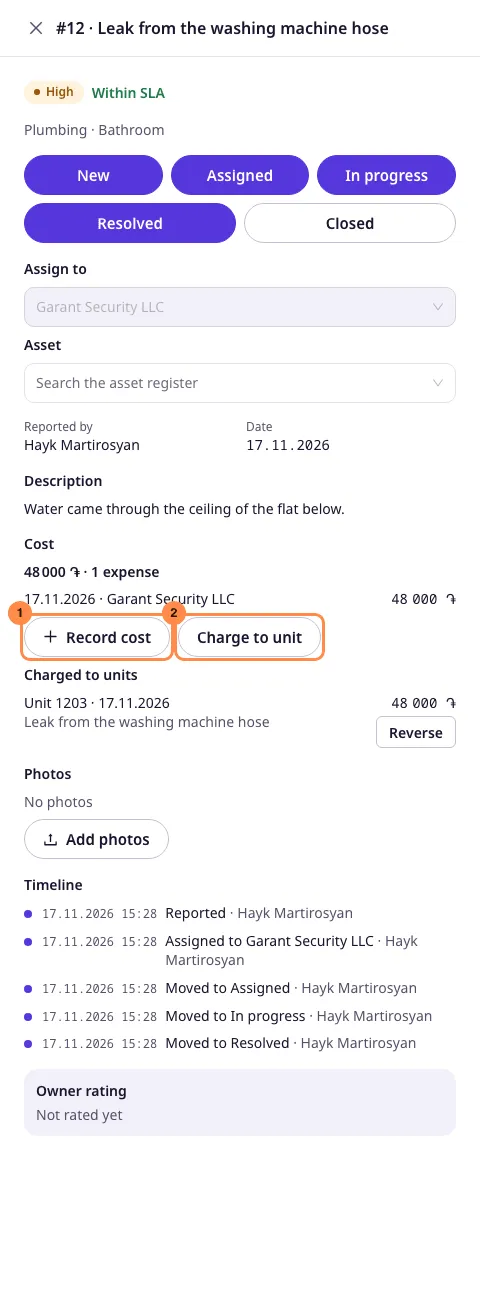
Open Maintenance and the ticket. The Cost section shows what the expenses linked to it add up to.
-
Select Record cost. The expense form opens with the ticket linked and its vendor, asset and a matching category filled in.
-
Enter the Amount, check the date, attach the vendor’s invoice under Receipts, and select Add expense.
The expense now counts on the ticket, on the vendor’s card, in the asset’s Spend tab and in the budget’s actual spending.
Charge it to the unit
-
Once the ticket is Resolved or Closed, select Charge to unit in its Cost section.
-
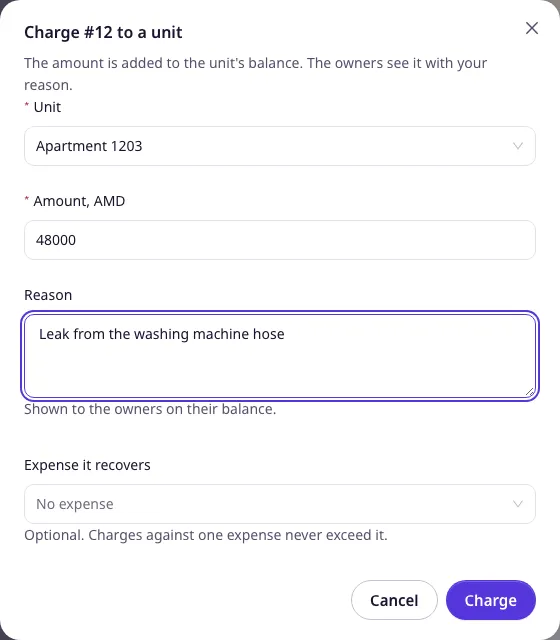
Fill in the charge:
- Unit starts at the ticket’s unit. Any unit with an owner can be picked.
- Amount, in the complex’s currency.
- Reason, up to 500 characters. The owners read it on their balance, so say what happened, for example Leak from the washing machine hose of flat 12.
- Expense it recovers, optional. The charges against one expense never add up to more than it.
-
Select Charge.
Result
The amount is added to the unit’s balance at once, with the ticket’s number and your reason. The owners and co-owners get a notification and see it under Other charges on their Payments page; it is paid like any other debt and counts in the debtors list. The ticket lists the charge under Charged to units.
Take a charge back
If the charge was a mistake, select Reverse beside it, give the reason and confirm. The amount comes off the balance, the charge stays on the ticket struck through with Reversed and the reason, and the owners see it marked Reversed.
Rules
- You can’t charge a unit you own, or reverse a charge to it, even as an administrator: another manager does. When the ticket is about your own unit, a note says so, and you can still charge another unit.
- Charge to unit waits until the ticket is resolved, so the work is done before anyone is billed.
- Every charge and reversal is written to the audit log.