Maintenance
The tickets of a complex on a board or in a list, each with its deadline, assignee, photos and history, and the planned maintenance calendar.
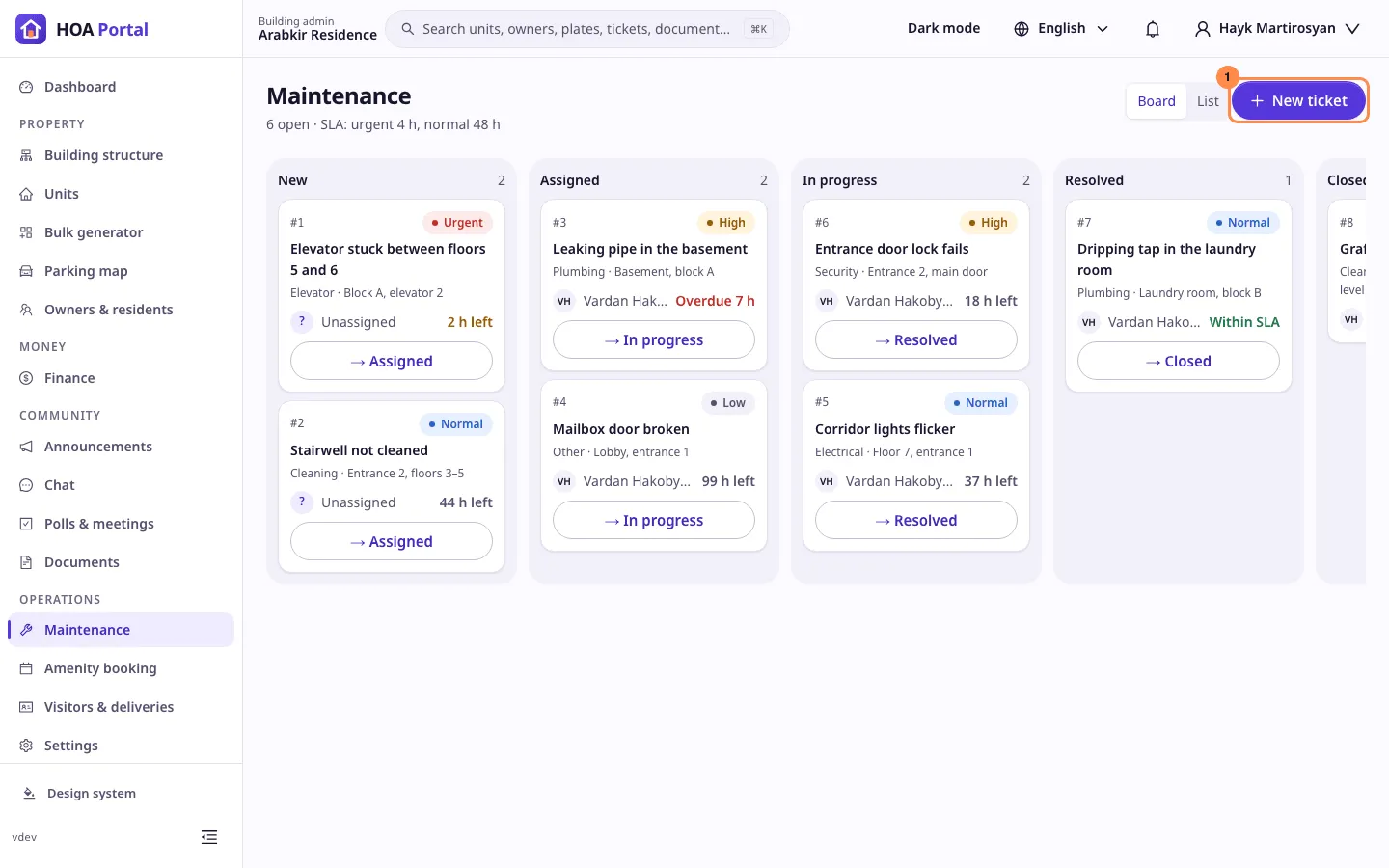
The Maintenance page shows the complex’s tickets: a leaking pipe, a stuck elevator, a broken lock. Each ticket has a priority, a deadline and someone working on it. The header counts the open tickets and shows the deadlines: 4 hours for an urgent ticket and 48 hours for a normal one, by default.
Who can use it
Sidebar › Operations › Maintenance, with Manage tickets:
- A Complex Admin, or an Org or Global Admin inside the complex, sees every ticket, assigns them and closes them.
- Maintenance staff and concierges see the tickets assigned to them or reported by them. They start and resolve their own tickets.
The board
Board shows five columns: New, Assigned, In progress, Resolved and Closed, each with its count. A card shows the ticket’s number, priority, title, category and place, who works on it and its deadline:
- 5 h left turns amber when 6 hours or less are left.
- Overdue 2 h is red once the deadline has passed. The assignee and the Complex Admins are also notified once.
- Within SLA means the ticket was resolved in time.
The → button at the bottom of a card moves the ticket to the next status. A ticket only moves forward, one step at a time. Moving a new ticket first asks Assign to: pick a member of the maintenance staff or a vendor. A column shows at most 50 tickets; Open the list shows the rest.
The list
List shows the same tickets as a table you can search by title or number. Filter it by status, priority, category, assignee or Overdue only, sort it, and save the view. On a phone each ticket is a card.
A ticket
Click a ticket to open it:
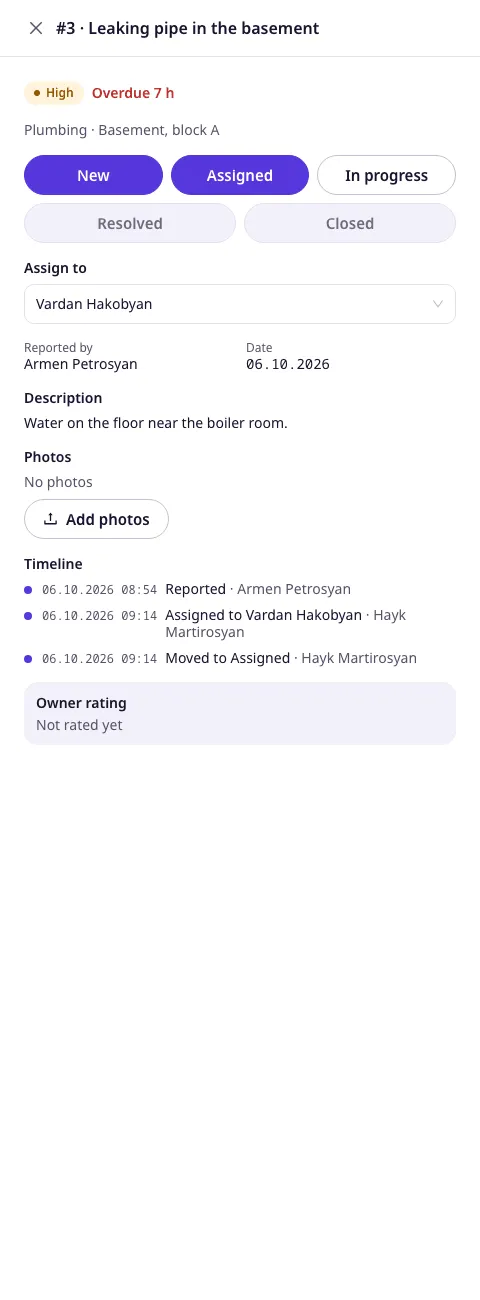
- The status steps: the next one moves the ticket on.
- Assign to: the maintenance staff and the active vendors of the complex, in two groups. A staff member needs an account and the Maintenance staff role. Link one, or add a vendor, under Staff, shifts and vendors.
- Reported by, the date and the description.
- Photos: up to 5 JPEG, PNG, WebP or HEIC photos of 10 MB each. Click one to open it. Add photos works until the ticket is closed.
- Timeline: every report, assignment, move and photo, with who did it.
- Owner rating: shows Not rated yet until the owner can rate the work.
Report a ticket
New ticket opens a panel: a Title of 3 to 200 characters, a Category (Plumbing, Electrical, Elevator, Cleaning, Security or Other), a Priority (Urgent, High, Normal or Low), a Location, the Unit, What happened? and up to 5 photos.
Every report, assignment and move is written to the audit log.
Planned maintenance
Calendar shows the work planned for the complex: an elevator inspection, the weekly stairwell cleaning, a seasonal check. On a computer it is a month grid; on a phone, a list of the month’s work with the date, the hours and the place, such as 09:00–16:00 · Entrance 2. Use the arrows to move between months and Today to come back. The times are the complex’s; when your own time zone differs, a badge such as UTC+4 says so.
A Complex Admin, or an Org or Global Admin inside the complex, selects Plan work to add work, or selects work in the calendar to edit or delete it. The panel asks for:
- A Title of 3 to 200 characters and a Category.
- Starts and Ends, on the complex’s clock. The work must end after it starts and last at most 31 days.
- Repeats: Does not repeat, Every week, Every month, Every quarter or Every year. Repeating work keeps its time across daylight-saving changes, and work on the 31st falls on the last day of shorter months. It must last less than a week when it repeats every week, and less than 28 days when it repeats every month, quarter or year. Last date ends the series; leave it empty to repeat with no end.
- The Entrance it affects, or none for the whole complex, a Location, the Vendor doing it and Notes.
Editing or deleting repeating work changes every occurrence. Maintenance staff and concierges see the calendar and the details of each plan, but cannot change them.
The day before each occurrence, the Complex Admins and the owners and residents of the entrance, or of the whole complex when no entrance is chosen, get a notification such as Planned work: Elevator inspection on 10.10.2026 09:00. Each occurrence is reminded once. Owners and residents also see the next 30 days of work that affects them on their Home, without the vendor.
Every plan added, changed or deleted is written to the audit log.