Staff, shifts and vendors
The concierge, security, cleaning and maintenance staff of a complex, when they work and the account each may be linked to, beside the vendors and contractors who service it.
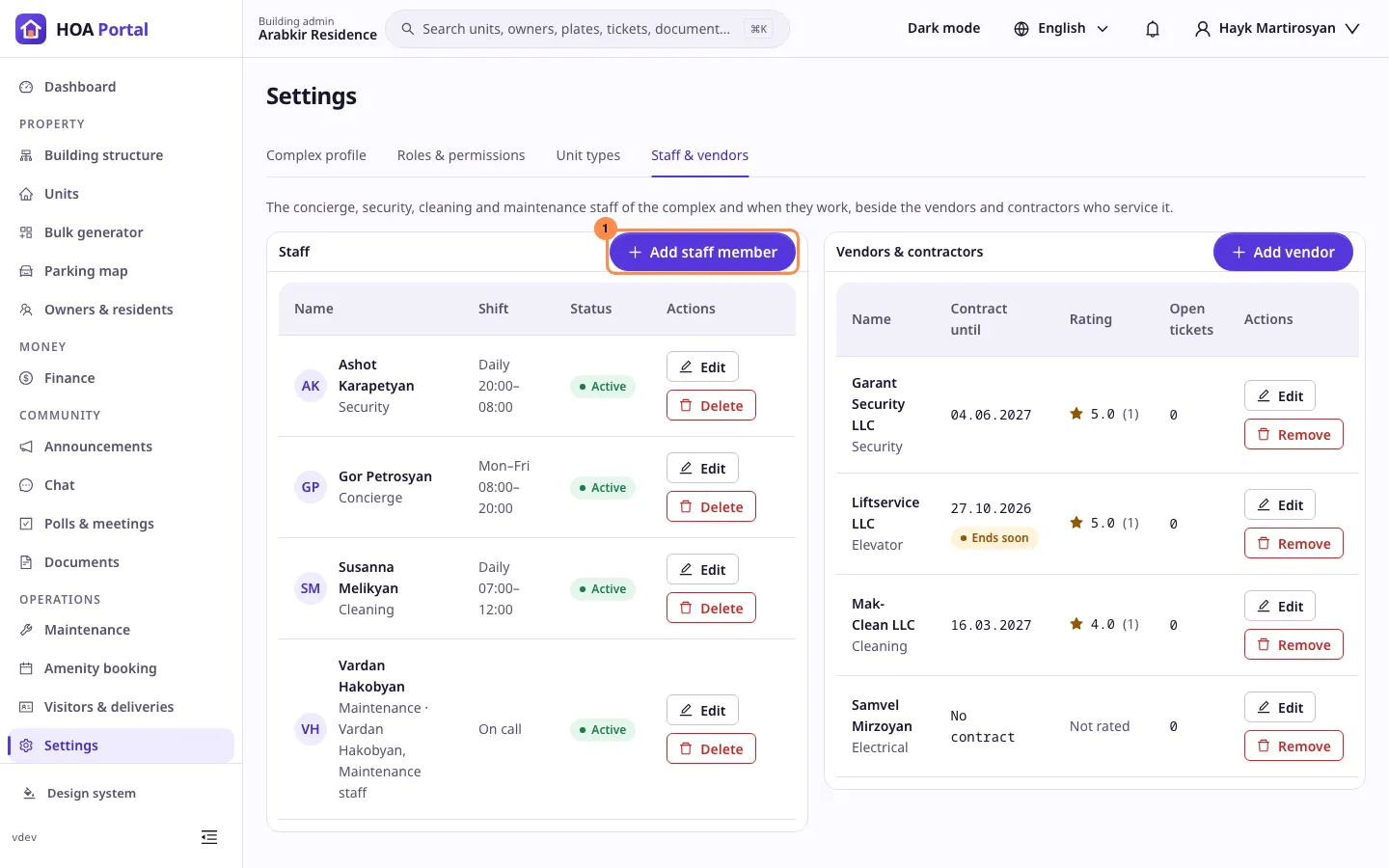
The Staff card lists the people who work in a complex: concierges, security guards, cleaners and maintenance staff, with their shifts. Beside it, the Vendors & contractors card lists the companies and tradespeople who service the complex.
Who can use it
Sidebar › Settings › Staff & vendors, with Manage owners, residents & staff: a Complex Admin, or an Org or Global Admin inside the complex. The Vendors & contractors card is beside it on the same tab; only a Complex, Org or Global Admin adds, edits or removes a vendor. Maintenance staff and concierges don’t open this tab, but they see the active vendors when a ticket is assigned.
Add a staff member
Add staff member opens a panel:
- Full name, required, up to 200 characters.
- Position: Concierge, Security, Cleaning, Maintenance or Other.
- Phone, optional.
- Linked account, optional: someone who already holds an active role in this complex. The account gets the Staff role you pick, Maintenance staff or Concierge / security; the position suggests one. You cannot link your own account, and an account links to one staff member only.
- Active: a deactivated staff member is hidden when work is assigned, and their account’s staff role is suspended until they are active again.
Shifts
Each staff member has up to 7 shifts. A shift has its days, and a Start and End time, or is On call, no fixed hours. Times are in the complex’s time zone, which the panel names; the list shows a time-zone badge when yours differs.
- A shift may run overnight: an end before the start, such as 20:00–08:00, ends the next day.
- A shift cannot start and end at the same time.
The list writes shifts as Mon–Fri 08:00–20:00, Daily 20:00–08:00 or On call.
Unlink or delete
Clearing Linked account removes the staff role from that account. Delete removes the staff member and their shifts, and a linked account loses its staff role.
Every change is written to the audit log.
Vendors and contractors
Each row shows the vendor’s name and category, Contract until, its rating and its open tickets.
- Ends soon marks a contract that ends within 30 days, Ended one that has ended.
- The rating, such as ★ 4.6 (12), is the average of the stars owners gave to the vendor’s tickets, with how many ratings it has.
Add vendor opens a panel:
- Name, required, up to 160 characters. Two active vendors of a complex cannot share a name.
- Category: Plumbing, Electrical, Elevator, Cleaning, Security or Other, the same categories as tickets.
- Contact person, Phone and Email, optional; they are the company’s business contacts.
- Contract until, optional, and the Contract document: a PDF, JPEG or PNG of up to 10 MB.
Editing a vendor also shows its latest tickets and, if you can read the finances, the expenses linked to it. Remove deletes a vendor that no ticket or expense names; otherwise it is deactivated, so the history keeps its name. A deactivated vendor is no longer offered when tickets are assigned or expenses recorded.
Related
- Roles and permissions: what Maintenance staff and Concierge / security may do.
- Complex profile: the complex’s time zone.
- Maintenance: assigning a ticket to a staff member or a vendor.