Pay in instalments and set up automatic payments
Accept a payment plan your association offers, pay each instalment, and let a saved card pay invoices and instalments automatically.
Who: an owner or co-owner of the home. Path: Payments › Balance & history.
Accept a payment plan
When your association offers to split your debt into monthly instalments, you get a notification and a Payment plan offered card appears on your Payments page.
-
Open Payments. With several homes, pick the one in Property.
-
Read the offer on the Payment plan offered card: the total, the number of instalments and the Schedule with each date and amount.
-
Select Accept plan and confirm, or Decline if it doesn’t suit you.
While you pay each instalment on time, no late fees are added and the association’s reminders pause. An instalment still unpaid five days after its due date ends the plan.
Pay an instalment
The Your payment plan card shows how much is paid so far, what is left, and the next instalment with its due date.
-
Select Pay this instalment. The payment page opens with that instalment’s amount.
-
Pay as usual, by card or another method. Any payment recorded on your home counts toward the plan, including a bank transfer, or a payment receipt you send once it is approved.
Select Show the schedule to see every instalment as Paid, Partly paid, Overdue or Upcoming.
Set up automatic payments
If your association’s subscription includes online payments, the Automatic payments card lets a saved card pay for you on each due date. You first need a saved card: pay once by card and tick Save this card for next time.
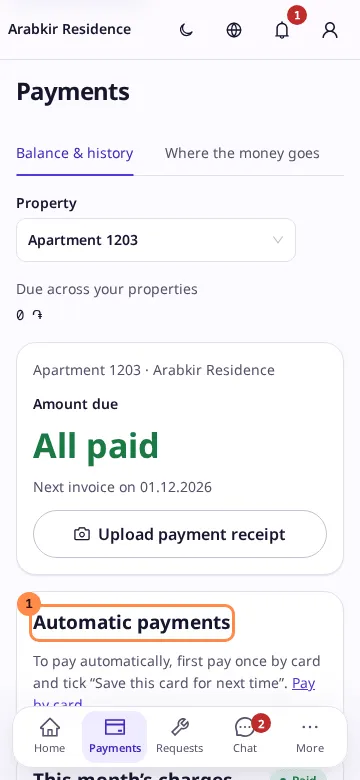
-
On the Automatic payments card, select Set up automatic payments.
-
Choose the Card and What to pay: Invoices and plan instalments, Monthly invoices or Plan instalments. While a payment plan is active, only its instalments are paid automatically.
-
Optionally set a Limit per payment. Each automatic payment takes at most this amount, and you pay the rest yourself.
-
Select Turn on.
The day before a payment, you get a notification. The card shows the Last payment, and a warning if a payment failed. After three failed payments in a row, automatic payments pause and you are notified.
Use Change to pick another card or limit, Pause and Resume to stop and restart, or Turn off to end them. Removing the saved card also turns them off.