Plan the reserve with a capital plan
Seeing when the building’s big replacements fall due, whether the reserve fund covers them year by year, and how well funded its reserve is.
The Capital plan tab answers three questions for the board: when the big costs come, whether the reserve fund covers them, and how well funded the reserve is today. It is built from the asset register: every asset with a replacement cost, an installation date and an expected life is replaced every life years, at its cost grown by inflation.
Who can use it
Sidebar › Finance › Capital plan. A Complex Admin, an Org or Global Admin inside the complex, an Accountant and a Board Member can read it and export it. A Complex Admin, an Org or Global Admin inside the complex and an Accountant can change its settings.
Read the plan
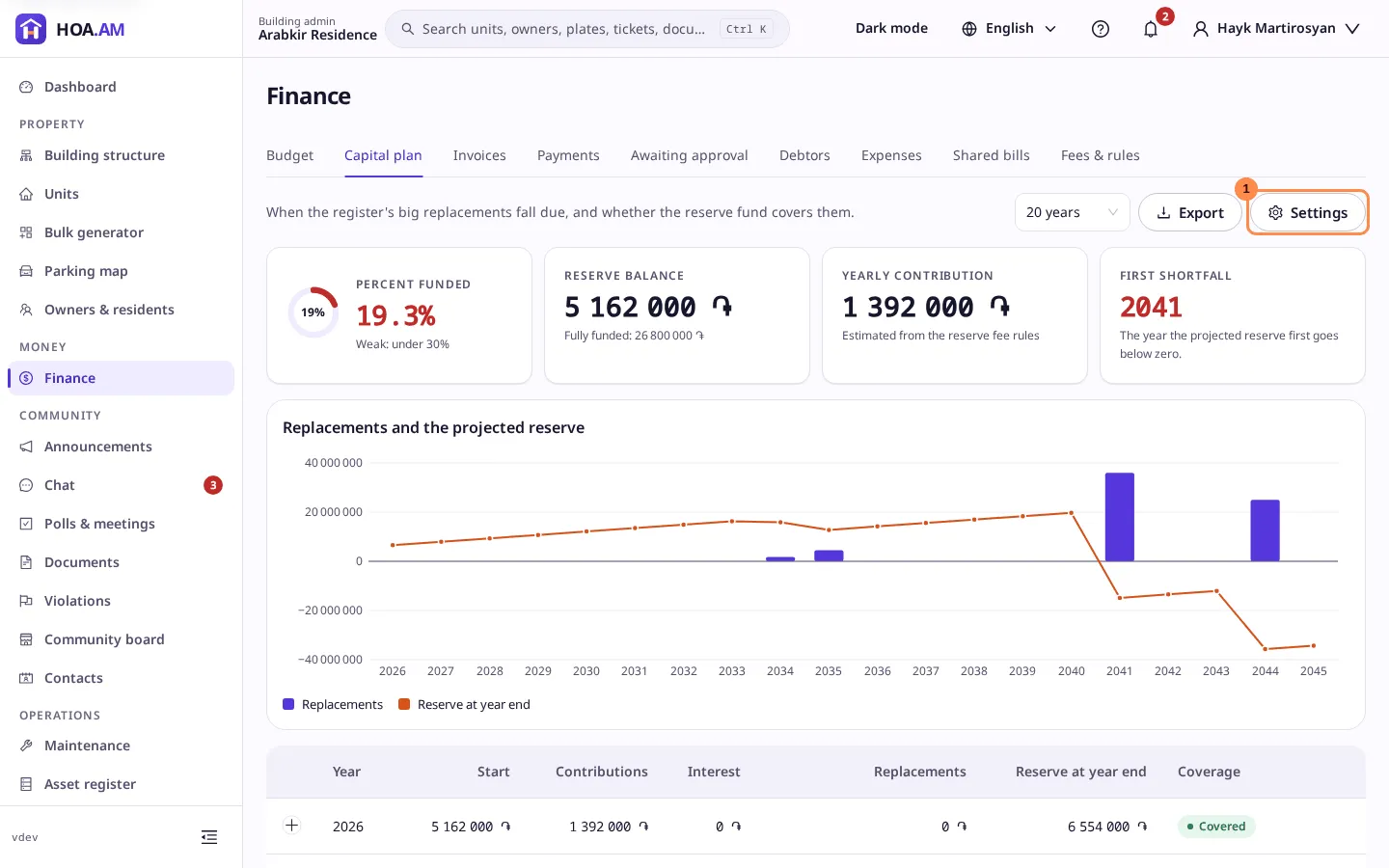
- Percent funded: the reserve balance against what the building would have set aside by now for the wear its assets already have (each asset’s cost × its age ÷ its life). Under 30% is weak, 30 to 70% fair, 70% or more strong. It reads — until at least one asset has a cost, an installation date and a life, and while every such asset was installed this year, since nothing has worn yet.
- Reserve balance: the reserve fund today, with the fully funded amount under it.
- Yearly contribution: what goes into the reserve each year. Unless it is set in the settings, it is estimated from the reserve fee rules: twelve months of each rule marked as a reserve contribution, over the units that pay it.
- First shortfall: the first year the projected reserve goes below zero, or None when the reserve covers every replacement in the horizon.
The chart shows each year’s replacement cost as a bar and the reserve at the end of the year as a line. A year with an overdue replacement has its bar in a warning colour. On a phone the chart scrolls sideways inside its card.
The table below has one row per year: the reserve at the start, the contributions, the interest, the replacements, the reserve at the end and whether the year is Covered or Short by an amount. Replacements on a row lists the assets replaced that year with their cost; an asset whose replacement date has already passed is marked Overdue and counted in the first year. On a phone each year is a card.
Horizon at the top of the tab shows the plan over 10, 20, 30 or 40 years, or the default horizon of the settings; the choice stays in the address. The plan starts in the current year.
Assets left out
Two banners count the assets the plan cannot use: one the assets without a replacement cost, the other those without an installation date or an expected life. Fill them in in the asset register; a reader who can open the register (a Complex Admin, or an Org or Global Admin inside the complex) gets an Open the asset register link in the banner. The plan updates as soon as an asset is saved.
Settings
Settings opens the plan’s assumptions:
- Inflation, % a year, from 0 to 25: how fast replacement costs grow.
- Interest on the reserve, % a year, from 0 to 25: earned on a positive balance.
- Yearly contribution, in the complex’s currency, optional: leave it empty to estimate it from the fee rules.
- Default horizon, years, from 5 to 40.
Both rates take at most two decimals. Save recalculates the plan for everyone who has it open. If someone else saved first, you are asked to reload their settings, so they are never overwritten. Each change is written to the audit log.
Export
Export saves the plan for the shown horizon as Excel or PDF. The file is prepared in the background and is ready to download when the export finishes; see saved views and exports.
In the budget
When the plan replaces an asset in the year you are budgeting, the Budget tab shows Planned replacements in 2027 with their total and names, so the reserve line can be planned with them in view.