Get a no-debt certificate for a sale
Download a clearance certificate for your home in one click and share its verification link with the buyer, notary or bank.
Who: an owner or co-owner of the home. Path: Payments › Balance & history › Clearance certificate.
A buyer, a notary or a bank usually asks for proof that the home owes nothing to the association. The portal issues it for you: a signed PDF with a QR code and a link anyone can open to check it for 30 days.
Steps
-
Open Payments. With several homes, pick the one you are selling in Property.
-
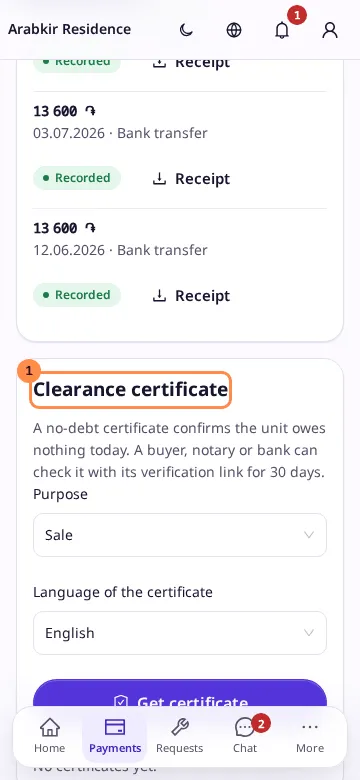
Scroll to the Clearance certificate card.
-
Choose the Purpose: Sale, Mortgage or Other, and the Language of the certificate.
-
Select Get certificate.
-
Select Download PDF to keep the certificate, and Share link to send its verification link. On a phone this opens the share sheet; on a computer the link is copied, and it is also shown under the buttons.
Result
The certificate is listed under Earlier certificates with its number, purpose and a Valid, Expired or Revoked chip. The download button next to it gets the same PDF again; the verification link is shown only when the certificate is issued, and it is also printed in the PDF’s QR code.
If the home owes anything, the card shows This unit owes … and a button to pay it instead of Get certificate. A certificate is also refused while an invoice is open or a payment receipt you sent waits for approval: the card says which. You can get three certificates a day.