Issue a clearance certificate
Issue a no-debt certificate or a debt statement from the unit card, download it, and revoke one issued by mistake.
Who: the Complex Admin, and staff whose role holds Finance read to see certificates and Finance manage to issue and revoke them. Path: Property › Units › a unit › Clearance certificates.
Owners get a no-debt certificate themselves from their Payments page. Staff issue one for an owner who asks at the office, and issue a debt statement when the unit owes: it states the balance on the day.
Steps
-
Open Units and select the unit. Its card opens on the right.
-
In Clearance certificates, select Issue certificate.
-
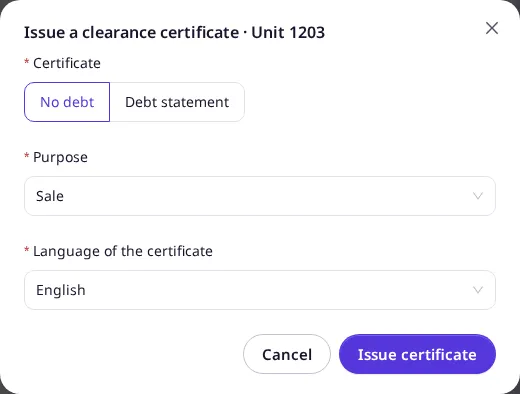
Choose the Certificate: No debt or Debt statement. Then choose the Purpose and the Language of the certificate.
-
Select Issue certificate. If you asked for No debt and the unit owes, the dialog shows the amount and switches to Debt statement; record the payment first, or issue the statement. A No debt certificate also waits for every open invoice to be paid and every payment receipt to be approved or rejected: the dialog says which.
-
Select Download PDF, and Share link to copy the verification link. The link is shown only now; it is also printed in the PDF’s QR code.
Result
The certificate is listed in the card’s Clearance certificates with its number, kind, purpose, who issued it and until when it is valid. The download button gets the PDF again.
To withdraw one issued by mistake, select Revoke, give the reason and confirm. Anyone who opens its link then sees it as revoked. You cannot issue or revoke a certificate of a unit you own yourself.
When you Transfer ownership from the unit card, the dialog shows the unit’s latest valid no-debt certificate, or warns that it has none with a button to issue one. A debt statement does not count. The transfer is never blocked by it.