Split a common-area bill
Splitting one supplier bill for the common areas across the units, by area, equally or by meter readings, and charging each unit its share.
Many buildings get one supplier bill for the common areas: the stairwell lighting, the elevator’s power, the water for the yard. The Shared bills tab splits such a bill across the units. When you post it, each unit is charged its share on its account and the bill is recorded once as an expense.
Who can use it
Sidebar › Finance › Shared bills. A Complex Admin, an Org or Global Admin inside the complex, and an Accountant can add, post and void shared bills. A Board Member can read the list and the shares.
Add a bill
Add shared bill opens a form that asks for:
- Title: what the bill is for, for example
Stairwell lighting. It names the charge on each owner’s account statement. - Month: the month the bill covers. It cannot be in the future.
- Total, in the complex’s currency, as the supplier billed it.
- Expense category: Utilities by default. The bill is recorded as an expense of this category, so the budget counts it.
- Split:
- By area: each unit pays in proportion to its area. Units without an area are left out.
- Equally: each unit pays the same share.
- By consumption: each unit pays in proportion to its meter’s consumption in the bill’s month. Choose the Meter (cold water, hot water, gas or electricity). A unit whose reading is missing is estimated from its earlier months; a unit with no readings at all is left out.
- Unit types, optional: leave it empty to split over the apartments and houses, or choose the types the bill covers, for example offices and commercial spaces too.
- Supplier bill, optional: one PDF, JPG or PNG file of at most 10 MB. It becomes the expense’s receipt.
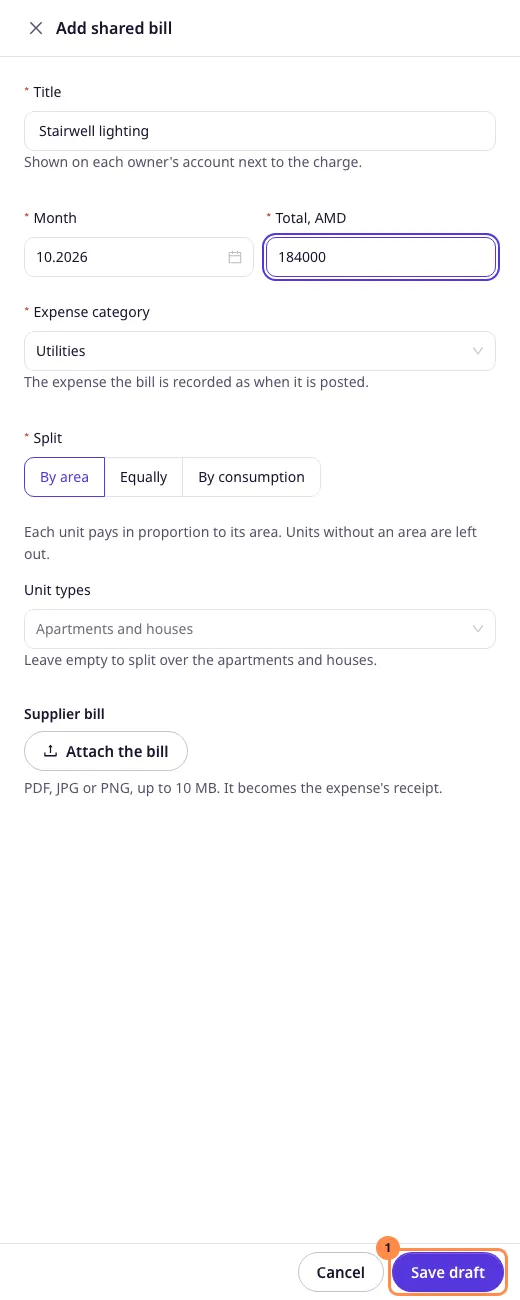
Save draft keeps the bill as a draft. Nothing is charged yet, and you can still edit or delete it.
Preview and post
The draft’s preview opens next, and Preview and post on a row opens it again. It lists each unit with what it weighed (its area or its consumption, marked estimated when the reading was estimated) and its share. The shares always add up to the total exactly: a remainder of a few minor units (cents, luma) goes to the units whose share was rounded down most. Below, the preview names the units left out and why.
Post to N units asks you to confirm, then, in one step:
- charges each unit its share on its account, with the bill’s title;
- records the bill as one expense of its category, with the supplier’s file as its receipt.
Each owner’s balance on their Payments page includes their share, and Download statement there lists the charge with the bill’s title. A posted bill can no longer be edited.
Void a bill
Void asks for the reason. A posted bill’s charges are all reversed and its expense is deleted; a draft is simply set aside. Voiding cannot be undone: enter the bill again if it was voided by mistake.
Drafting, editing, deleting, posting and voiding a bill are all written to the audit log, with who did it. An admin who owns a unit in the building may still post a bill: it is a building cost, not their own request. They cannot void a bill that charged their own unit, since that would cancel their own charge; another admin voids it.