Forecast the cash flow
Seeing the money expected in and out month by month, the cash left at the end of each month, and the first month it may fall below the cushion.
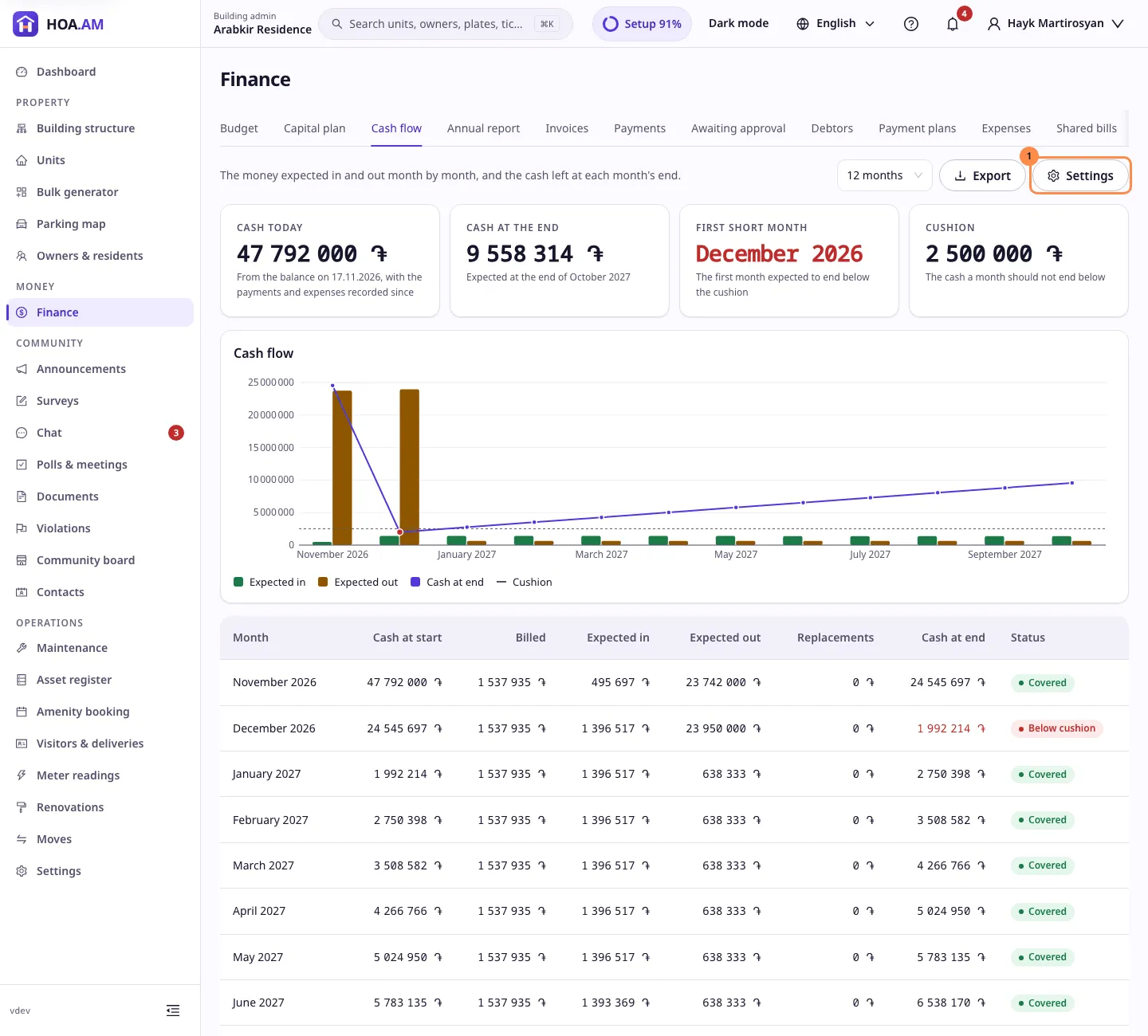
The Cash flow tab shows the board how much money the complex will have month by month. It starts from the cash in the bank on a day you choose, adds the payments and subtracts the expenses recorded since, and then forecasts each month ahead: what the fee rules bill and how much of it is usually collected, what the approved budget (or the recent spending) takes out, and the replacements the capital plan places in the year.
Who can use it
Sidebar › Finance › Cash flow. A Complex Admin, an Org or Global Admin inside the complex, an Accountant and a Board Member can read it and export it. A Complex Admin, an Org or Global Admin inside the complex and an Accountant can change its settings.
Set the starting cash
Until a starting balance is set, the tab explains why it is needed and offers Set starting cash. Settings opens:
- Starting cash, in the complex’s currency: the bank balance on a day. A negative balance is an overdraft. Empty the amount to clear the starting point; its date is cleared with it.
- Balance on: the date of that balance, today or earlier. An amount needs its date.
- Cushion: the cash a month should not end below; 0 for none.
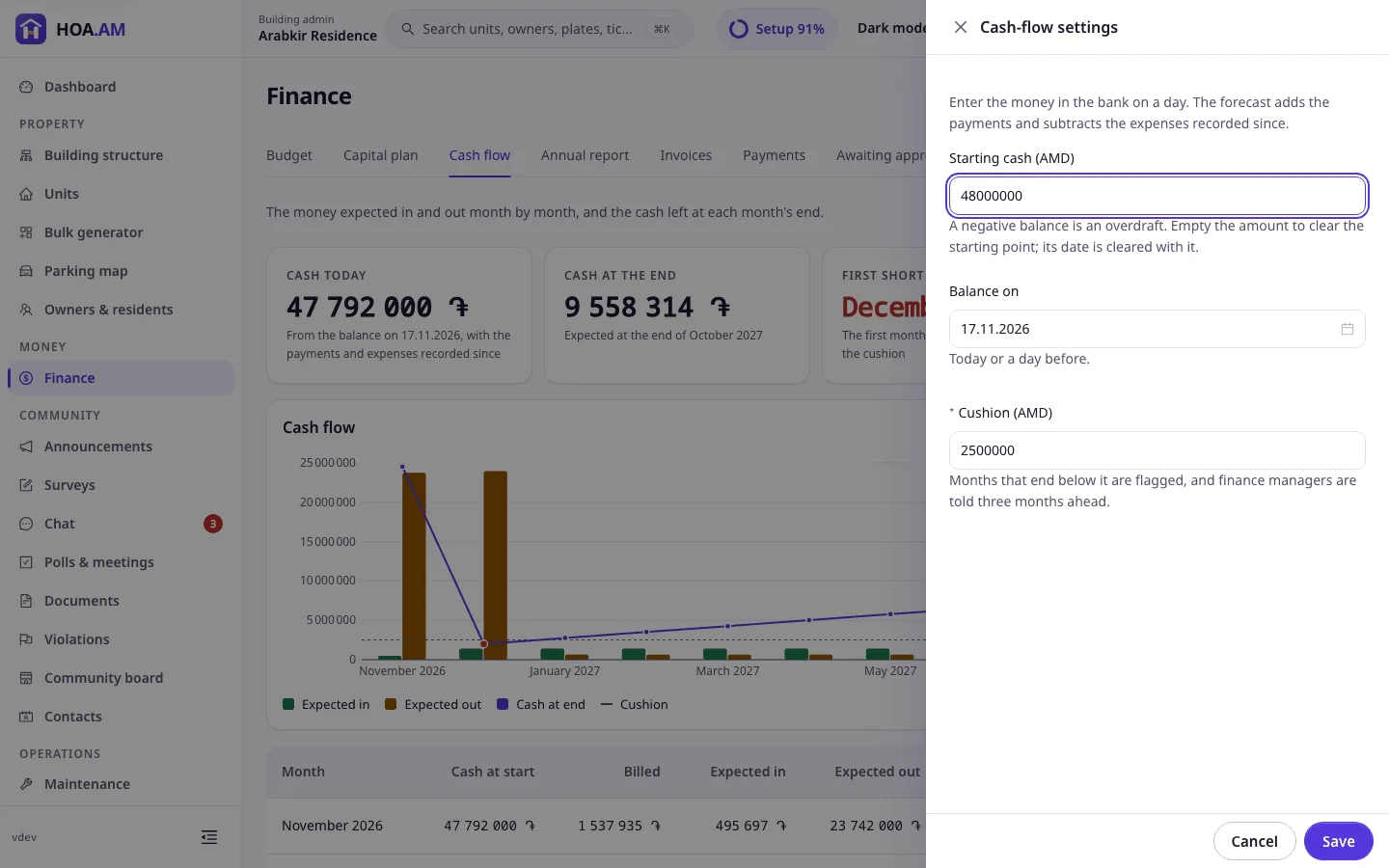
Save recalculates the forecast for everyone who has it open. If someone else saved first, you are asked to reload their settings. Each change is written to the audit log.
Read the forecast
- Cash today: the starting balance with the payments and expenses recorded since.
- Cash at the end: the cash expected at the end of the last month shown.
- First short month: the first month expected to end below the cushion, or None.
- Cushion: the level set in the settings.
The chart shows each month’s expected money in and out as columns, the cash at the end of the month as a line, and the cushion as a dashed line. A month that ends below the cushion has its point in a warning colour. A screen reader reads the same figures as a table.
The table below has one row per month: the cash at the start, what is billed, what is expected in, what is expected out (a one-off expense included), the capital plan’s replacements, the cash at the end and whether the month is Covered or Below cushion. Estimated marks a month whose consumption fees are estimated from the units’ average readings. On a phone each month is a card.
Forecast horizon at the top shows 3, 6, 12, 18 or 24 months; the choice stays in the address.
What if
The What if panel tries other figures without changing the settings:
- Collection rate: the share of what is billed that comes in, from 0 to 100%.
- Change every fee by: a percent from −50 to 100, applied to every fee rule.
- One-off expense: an amount and the month it falls in.
The forecast updates as you type, and Reset drops every lever. The levers stay in the address, so a link shares the same what-if.
What the forecast assumes
The forecast is an estimate, and each of its figures follows one rule. The last card names what was used, and each of its lines links to the tab the figure comes from.
- Cash today: the starting cash, plus the payments and minus the expenses recorded from the balance date to today. Anything dated before the balance date is taken to be in the balance already.
- Billed: what the monthly invoices would bill under the fee rules in force in that month, for the units that have an owner. A rule that ends stops billing after its last month, and a rule priced in another currency is left out; the card says how many are. A fee per consumption is counted at each unit’s average of the last three finished months and marked Estimated.
- Collection rate: what was collected of what was billed over the 12 months before this one, or 100% while there is no billing history. The money expected in is the billing times this rate. A rate set in What if replaces it.
- Payment plans: what is still unpaid of the active plans’ instalments is added to the month each falls due in. The collection rate is not applied to it.
- Expected out: in a year with an approved budget, what is left of the budget is spread evenly over the year’s months still to come. A year without one uses the average month of the 12 months before this one.
- Replacements: the capital plan’s replacements of a year are all placed on its January, so they count only when that January is within the horizon. A forecast opened after January has none of the current year’s replacements.
- This month: what was already paid in and spent this month is taken off its expected money in and out, so nothing is counted twice.
The forecast knows nothing of a cost that is in neither the budget nor the capital plan, nor of this year’s replacements once January has passed. Add such a cost as a one-off expense in What if to see its effect.
Export
Export saves the forecast for the shown horizon and what-if as Excel or PDF. The file lists the levers it used above the table. It is prepared in the background; see saved views and exports.
On the dashboard
The Complex Admin dashboard’s budget card warns when cash may fall below the cushion within three months, else shows the cash expected at the end of next month, with a link to this tab. Finance managers are also notified when a coming month is expected to fall short.