Create a complex with the assistant
Describe a building or a district in a chat, check the summary the assistant builds and create the complex yourself.
Who: the Global Admin, or an Org Admin in their organization. Path: Sidebar › Complexes › New complex, then Set up with the assistant.
The setup assistant asks about the complex step by step and fills in the same details as the form wizard. It only drafts. Nothing exists until you select Create complex, and it never says that the complex has been created.
Steps
-
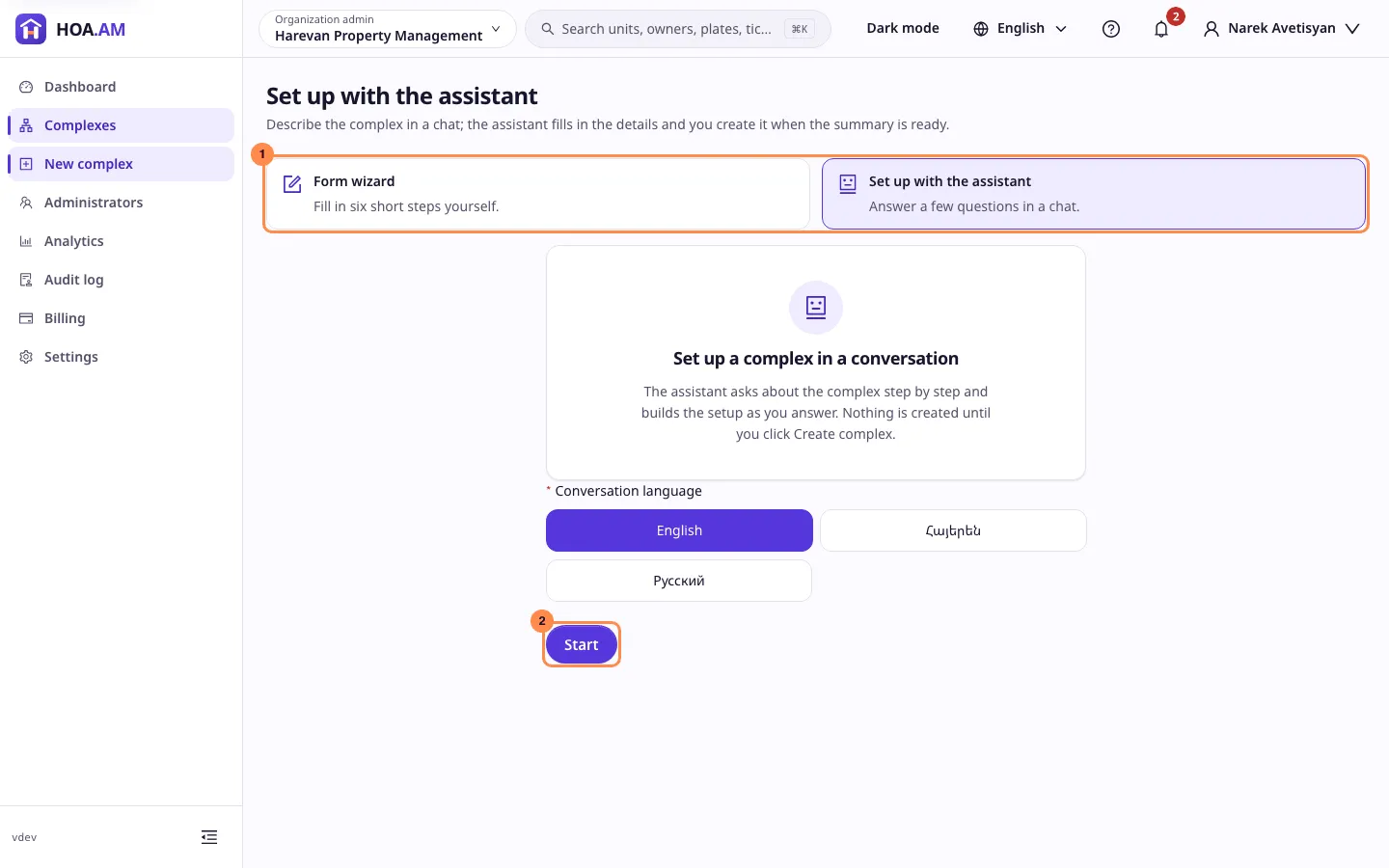
Open New complex. Above the form, Ways to set up a complex offers Form wizard and Set up with the assistant (1). Select the assistant. The Global Admin first chooses the organization the complex will belong to.
-
Choose the Conversation language, one of the languages offered, and select Start (2). If you left a conversation unfinished, it opens again where you stopped.
-
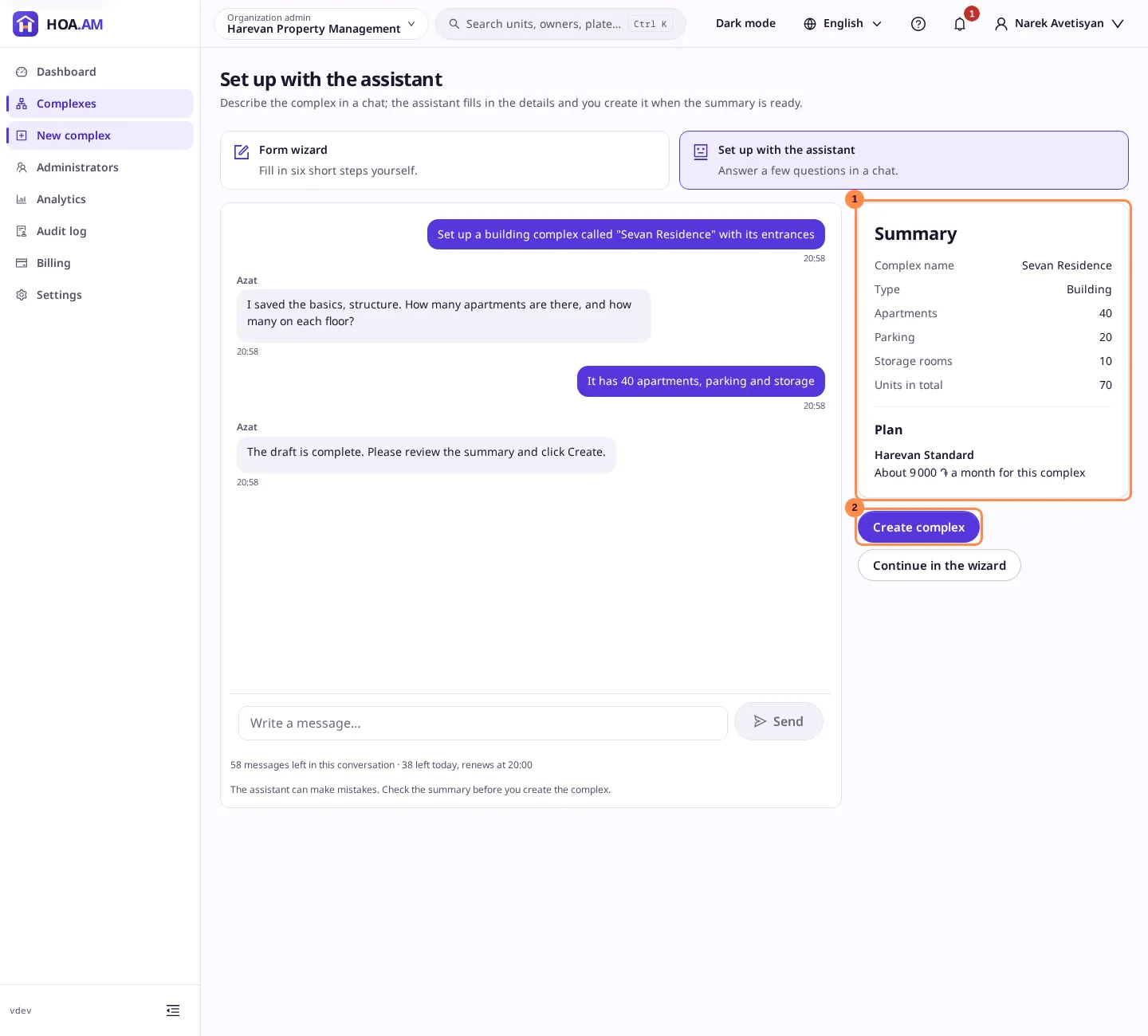
Tell the assistant about the complex in your own words, or select one of the suggestions to begin. It asks for the name and type, the entrances and floors, the apartments, the parking slots and storage rooms, and how the owners should be invited. The Complex summary beside the chat fills in as you answer (1). At its top, each of the six setup steps is marked Filled in, Needs attention or Not yet, with the figures collected so far and what to fix under each step. While the assistant works, its reply says what it is doing, for example Updating the summary… On a phone the summary is a sheet: select Show the summary; the button says Updated when the summary changed since you last opened it.
You can ask a question at any point, for example How do owners pay their invoices? or What does the concierge see? The assistant answers from this user guide, including the articles for Complex Admins, staff and owners, and lists the articles it used under its reply. Then it asks again the question it was waiting on. It is told not to change the summary for a question, but check the summary as always.
-
Read the summary. To change something, say so in the chat. To finish the details yourself, select Continue in the wizard: the form opens with what the assistant collected.
-
When nothing is missing, Create complex becomes available (2). Select it, read the review of the steps, of what was left empty and of any plan warning, and confirm with Create complex. The assistant checks the draft with the same rules as the wizard, so a problem is shown in the chat with the step to fix.
-
Keep an eye on the lines under the message box: how many messages are left in this conversation and for you today. Questions count as messages. A message about something outside the portal, such as the weather or a poem, gets a short refusal, and it still counts against both limits.
-
If a reply does not arrive, select Try again under the last message. When the reply had failed, this sends your last message again and uses one message. To discard the conversation and its summary and begin a new one, select Start over and confirm; you choose the conversation language again. How the assistant works opens this article.
Result
The toast says Sevan Residence created with 75 units. and the complex opens on its Getting started checklist, exactly as after the wizard. If you asked for QR posters, the page first offers each entrance’s poster to print. Anything the assistant did not ask about, such as the admins, can be set from the checklist.
When the conversation reaches its message limit, the daily limit is used up or the assistant is switched off, the page says so and offers Use the form wizard instead; when the conversation reaches a limit, the wizard takes the summary with it. The assistant can make mistakes, so always check the summary before you create the complex.